Valhalla
The one command that shows my entire personal-AI stack at once, a live terminal command center over every Claude account, VM, daemon, and MCP server on my Mac, with a way to reach into each of them.
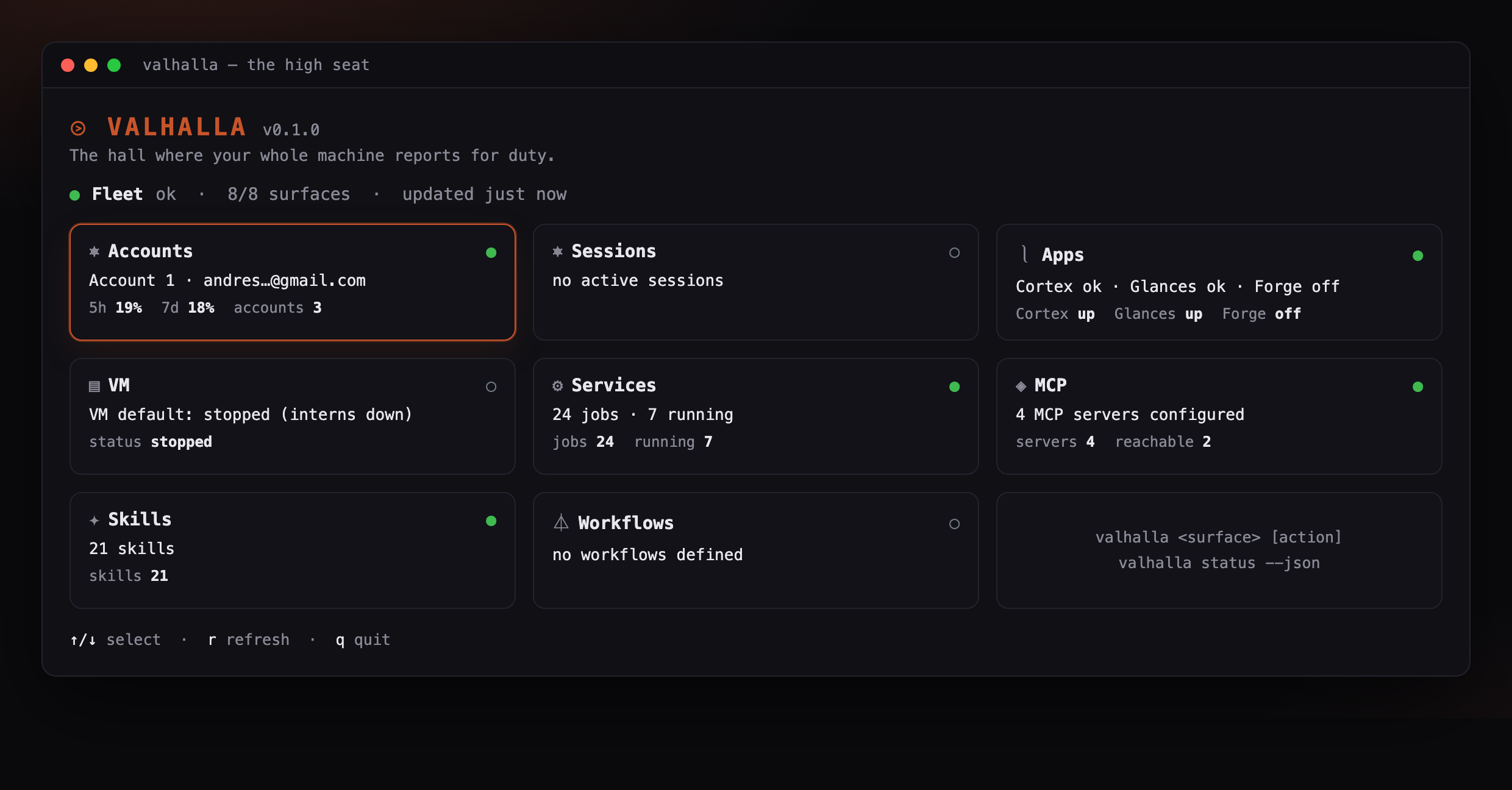
The desktop app in action.
Valhalla is a single command that shows my whole personal-AI stack at a glance and dispatches into each piece of it. I run a lot on one Mac: Claude accounts I rotate with cswap, a Lima VM full of agents, about two dozen launchd daemons, a handful of MCP servers, and a folder of skills. Checking any of it used to mean remembering a different command every time. Now `valhalla` opens one live board where every part reports in.
The design is deliberately thin. Each of the eight surfaces is a small module behind one shared interface, and every surface shells out to the tool that already owns the truth, cswap, limactl, launchctl, tmux, instead of reimplementing it or storing a secret. Probes run in parallel and each races a timeout, so one stuck service degrades to a single gray card instead of freezing the view. Bare `valhalla` opens an Ink dashboard, a verb like `valhalla accounts switch 2` runs an action, and `valhalla status --json` hands the whole fleet to another script.
I had built a whole personal operating system without a front door. The pieces were healthy on their own, but seeing the state of all of them, or acting on any one, meant juggling a dozen tools and remembering which command belonged to which. I wanted one place that reads everything at once and lets me act, without becoming a second system to maintain.
- One command surfaces the whole machine: a registry of eight independent surfaces folds about 23 launchd jobs, 6 MCP servers, a Lima VM, and 21 skills into a single board read in one glance.
- It wraps the tools it reports on and never reimplements them: every surface shells out through one execFile helper that passes argument arrays, so there is no shell string to inject into and no credential ever leaves its original tool.
- A live board, not a static dump: the Ink dashboard re-probes every five seconds, colors each card by health, and lets me arrow into any surface to read its rows.
- One hung service can never blank the board: probes run in parallel and each races a ten second timeout, so a stuck VM becomes one gray card instead of a frozen screen.
- Adding a surface is one file behind a six field interface: a new integration is a single module plus one line in the registry, and each surface keeps its parsing pure so it is unit tested without the live machine.
- Safe by default, scriptable when I want: read-only probes run on their own, mutations like switching accounts or starting the VM sit behind a confirm prompt, and a JSON mode hands the fleet to other scripts.
corelibraryThe Surface contract, the surface registry, a parallel timeout-guarded probe runner, an execFile shell wrapper, config, and the plain-text renderer.
surfacesmoduleOne module per surface (accounts, sessions, apps, vm, services, mcp, skills, workflows), each a pure parser behind a never-throwing probe plus its actions.
tuiappThe Ink dashboard: a card grid colored by health, a selectable detail pane, and a five second auto-refresh.
clicliThe commander entry: bare valhalla opens the dashboard, every surface is a subcommand, and status --json prints the fleet for scripts.
testtestsVitest unit tests over each surface's pure parser, using real fixture output so they stay green where cswap, lima, and launchctl do not exist.