PortPeek
A native macOS menu-bar app that shows everything listening on your localhost ports and lets you evict it, built in one 97-minute session of Swift and C.
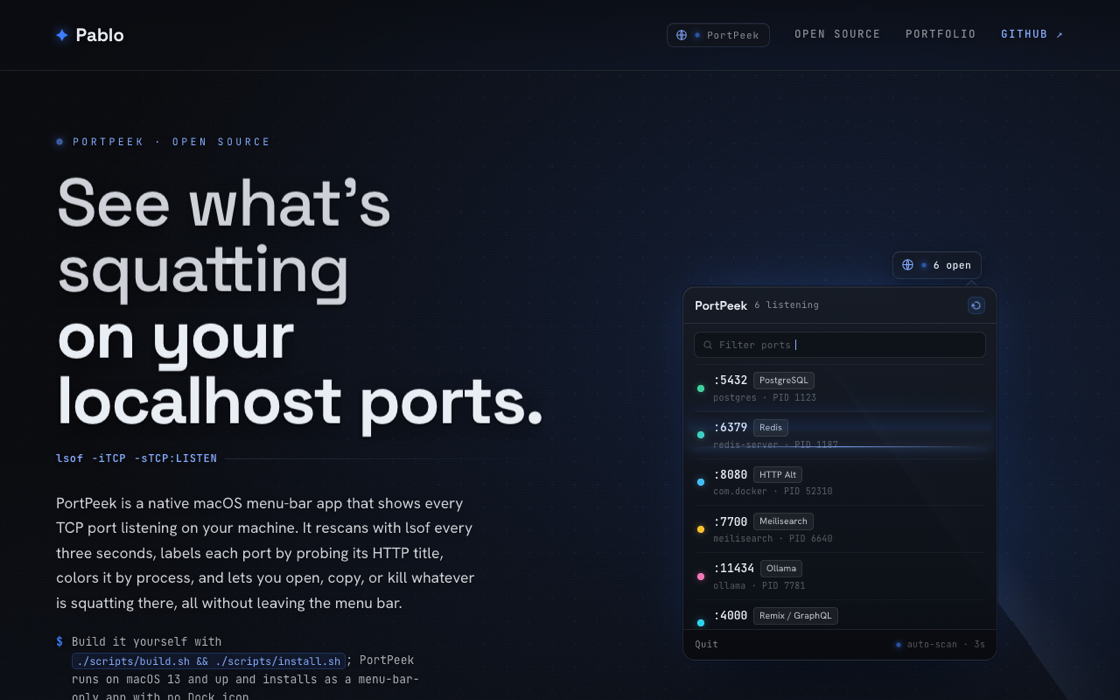
The desktop app in action.
PortPeek is a native macOS menu-bar app that shows everything listening on your localhost ports and lets you evict it without opening a terminal. It lives in the menu bar as an LSUIElement with no Dock icon, and a SwiftUI MenuBarExtra popover lists every LISTEN socket on the machine: a colored dot per process, the port in mono, a human label, and the process name with its PID. Hover a row and you can open it in the browser, copy its address, or kill it behind a two-step confirm.
Under the hood it is a three-second scan loop. A repeating timer shells lsof -iTCP -sTCP:LISTEN, parses the listener table, diffs it against the last pass, and for anything that looks like HTTP it fetches the port and pulls the page title so every server gets a real name, with a Server-header fallback and a hand-picked non-HTTP exclusion set so it never hangs on a database socket. I shell out through a small C popen wrapper because Swift's Process API proved unreliable for this. It is an honest one-session utility: 690 lines of Swift and C across 8 commits in a single 97-minute sitting, a native-macOS breadth piece next to the web and agent work.
Every dev machine collects a graveyard of forgotten servers holding ports. Port 3000 is already in use, some Postgres you forgot is still running, a stray Vite from last week, and finding and killing them means memorizing lsof flags and running kill by hand. PortPeek turns that into a glance at the menu bar and one click.
- The whole app is a three-second heartbeat. A repeating Timer in PortScanner.swift shells lsof -iTCP -sTCP:LISTEN -P -n, parses the listener table, and diffs it against the last pass so rows appear and disappear on their own, across roughly 180 lines.
- Swift's Process API proved unreliable, so it drops to C. Every shell call goes through a 34-line popen wrapper in Sources/CShell/shell.c that grows its own buffer and returns a C string, exposed to Swift as a CShell module, after a commit literally titled use C popen for reliable execution.
- Every port gets a human name, not just a number. For anything that looks like HTTP, fetchTitle in PortScanner.swift requests http://localhost on the port, extracts the page title, falls back to the Server header, and skips a 27-port non-HTTP exclusion set so it never blocks on Postgres or Redis.
- A lookup table of over a hundred ports colors and labels every row. CommonPorts.swift maps ~110 known ports (3000 to React and Next.js, 5432 to PostgreSQL, 6379 to Redis) and around 30 process-name patterns to a label and a SwiftUI color, in 211 lines.
- Killing a process is one hover and a two-step confirm. The PortRow in PortListView.swift reveals open-in-browser, copy-address, and kill actions on hover, asks Kill? before it acts, then calls kill(pid) and immediately rescans, across 228 lines.
- It is a true menu-bar-only citizen. A SwiftUI MenuBarExtra in window style with LSUIElement set in Info.plist means no Dock icon and no window chrome, and scripts/build.sh ad-hoc codesigns the .app so macOS lets it shell out at all.
PortScannerserviceThe three-second scan loop: it runs lsof for every LISTEN socket, diffs against the last pass, HTTP-title-probes each new port for a readable label, and kills a PID on demand.
PortListViewappThe SwiftUI menu-bar popover: a searchable, colored-dot port list with per-row hover actions to open, copy, or two-step-kill, plus empty and no-match states.
CommonPortslibraryThe port-intelligence table: ~110 known ports and ~30 process-name patterns mapped to a readable label and a SwiftUI color for each row's dot.
CShelllibraryA small C popen wrapper used instead of Swift's Process API, which proved unreliable for shelling out to lsof and kill from the menu-bar app.